Not Logged In
Education is not to be finished
You have been logged out. Please log in to continue.
Notifications
No notifications yet
We'll notify you when something new arrives
Meet the Young Innovators: Real Student Projects (and How You Can Build One Too)
The best way to show what our courses teach isn't to walk you through a curriculum; it's to show you what our students have already built with it. So instead of describing lessons in the abstract, we pulled three real profiles from our Young Innovators showcase: what these kids are learning, what they've made, and exactly which course gets your child to the same result.
Ali Ebrahim Khan, 11
Ali is an 11-year-old coder with a passion for both Python and Scratch, alongside a love for football and reading. Five courses into his journey, both of his showcased projects live in Scratch but don't mistake that for beginner work. They're proof of how far Scratch can go once you understand what's happening under the hood.
3D Maze
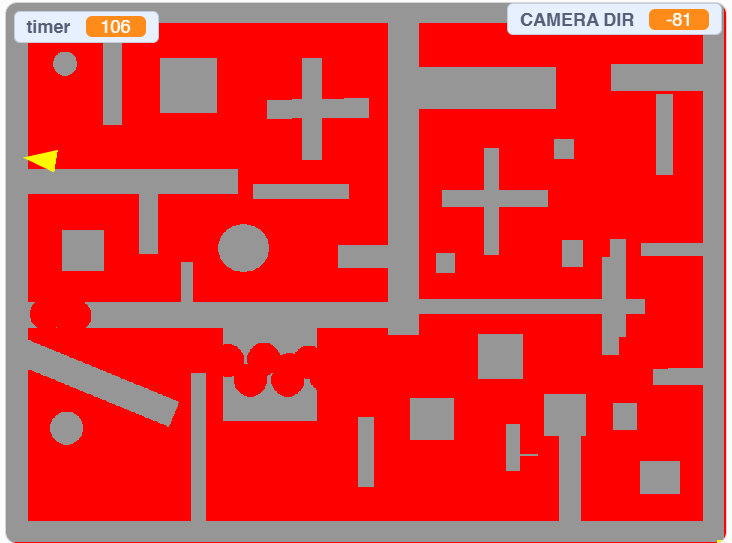
What it is: A maze-navigation game where the player moves through a corridor-based maze that appears to have real depth and perspective—even though Scratch only draws in flat 2D.
How it works: Scratch doesn't have a built-in 3D engine, so Ali had to fake it. The technique (known as pseudo-3D or "raycasting-style" rendering) works by redrawing the walls of the maze every frame based on the player's position and viewing angle, using math to make far-away walls look smaller and near walls look larger — the same trick that made classic games like Wolfenstein 3D possible on hardware that couldn't handle real 3D graphics.
Why it's impressive: Most Scratch projects work in a flat, top-down, or side-view world because that's what the tool is built for. Building an illusion of depth means understanding coordinate geometry, distance calculations, and frame-by-frame rendering logic—concepts well beyond "move 10 steps, turn 15 degrees." It shows Ali isn't just using Scratch's blocks; he's bending them to simulate something the tool was never designed to do
Diamond Collector
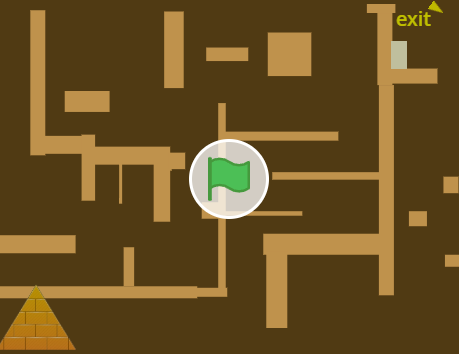
What it is: A maze-hunt game where the player searches for hidden diamonds scattered through a maze, while a separate on-screen map—styled after the Pyramid of Giza—tracks how close they are to finding them all.How it works: The core maze-and-collect mechanic uses collision detection to register when the player touches a diamond sprite. What sets it apart is the progress map: instead of using a default health bar or counter, Ali built a custom mini-map that visually fills in as diamonds are collected, which requires tracking game state (how many diamonds found, which ones remain) and reflecting it back visually in real time
Why it's impressive: Building a custom UI element from scratch, instead of relying on a simple score counter, means designing your own visual feedback system and keeping it in sync with what's happening in the game logic—a skill that maps directly onto how real game HUDs (health bars, mini-maps, quest trackers) are built.
Both projects are created in Scratch, but they draw on different levels of programming and computational thinking taught through The STEM Educators (TSE) courses. The foundational concepts required to build a maze game—sequencing, loops, variables, conditions, and movement logic—are developed through our Scratch Programming courses for beginners. As students progress, our Intermediate Scratch/Game Development courses introduce custom sprite design, vector art, multi-level game structures, and more complex game mechanics, providing the skills needed to create projects such as Diamond Collector. At the advanced level, our Advanced Scratch Programming courses build skills in pattern recognition, logical problem-solving, recursion, and computational thinking, which provide the conceptual foundation for more complex projects such as the pseudo-3D rendering used in 3D Maze. Thus, while both projects are built in Scratch, they demonstrate how students can progress from basic programming concepts to advanced computational thinking and game-development techniques through TSE's structured Scratch curriculum.
Maaz Uppal, 10
At just 10 years old, Maaz Uppal is already exploring the world of programming and developing his skills through hands-on projects. Currently enrolled in Python Level 2 at The STEM Educators (TSE), Maaz is building his understanding of programming while also experimenting with Scratch to bring his ideas to life.From interactive games to creative challenges, his Scratch projects demonstrate how young learners can use programming to develop logical thinking, creativity, problem-solving, and computational thinking skills.Below, we take a closer look at some of Maaz's Scratch projects and the programming concepts behind them.
Ping Pong Game
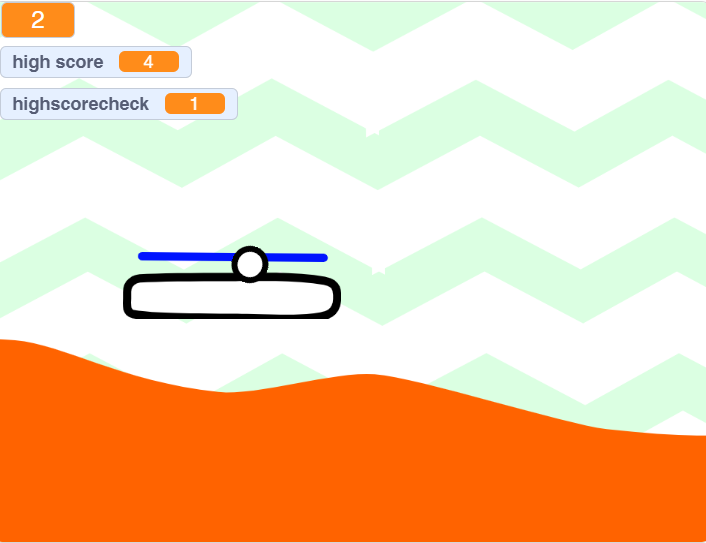
What it is: A two-paddle Pong-style game where each player controls a paddle to keep a ball in play, with sound effects triggered on each hit and miss.
How it works: The ball's motion is controlled with basic physics—constant movement in a direction, with its angle flipped whenever it collides with a paddle or wall. Both paddles need independent controls (usually different key sets for each player), and the game has to constantly check for three kinds of collisions at once: ball-to-paddle, ball-to-wall, and ball-missed-paddle (which usually triggers scoring or a sound cue).
Why it's impressive: Juggling motion, collision detection, and audio triggers all running simultaneously is a step up from a single mechanic game. It requires thinking about several moving parts of a system interacting with each other in real time, rather than one script running in isolation which is the same underlying skill used in far more complex simulations later on.
Cross the Road Game
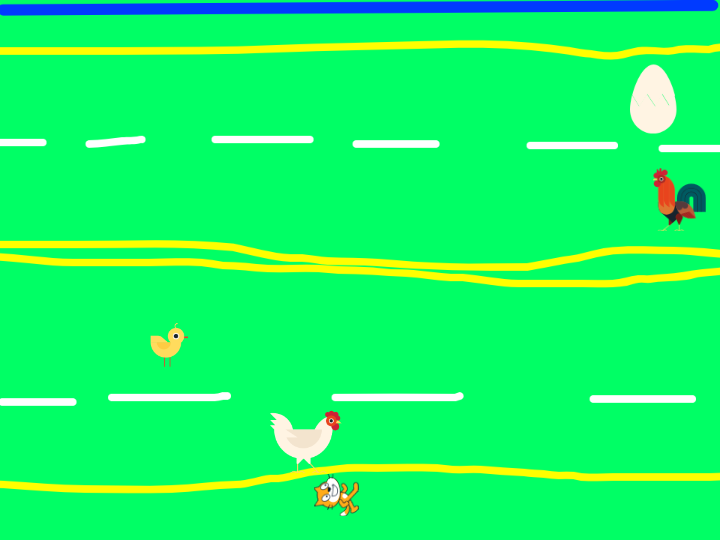
What it is: A timing and obstacle game built around the classic "avoid the traffic" mechanic, the player moves a character across lanes of oncoming obstacles without getting hit.
How it works: Obstacles (cars, logs, etc.) move continuously across the screen at set speeds, often on separate lanes moving in different directions. The player's sprite needs precise collision detection against multiple moving objects at once, along with boundary checks to register when they've successfully reached the other side.
Why it's impressive: Coordinating several independently moving obstacles, each on its own timer and direction, while checking constant collision against a single player sprite requires managing multiple objects at the same time—a core game-development skill that scales up to far more complex titles.
Running Cat Game
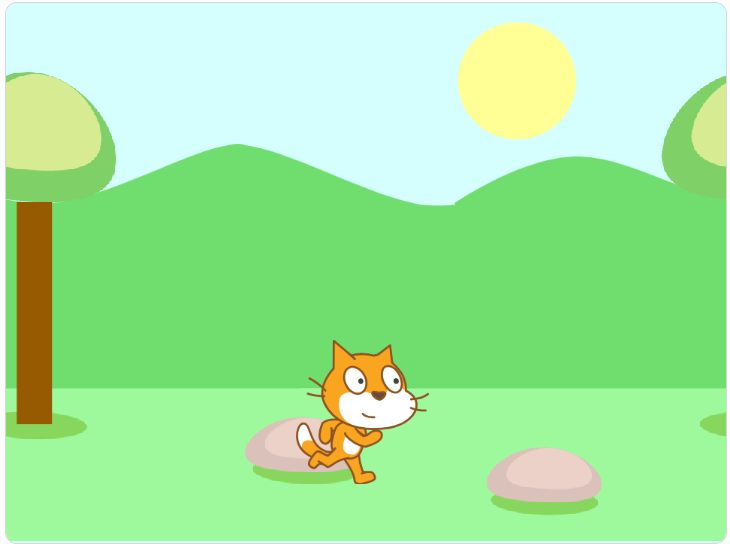
What it is: An endless-runner game as Maaz puts it, "just keep running" where the character auto-moves forward while the player reacts to obstacles or hazards that appear along the way.
How it works: The background typically scrolls or obstacles spawn and move toward the player at increasing difficulty, while the player character responds to a small set of controls (usually jump or duck). The game usually tracks a score based on survival time or distance.
Why it's impressive: Endless runners look simple but require handling procedurally repeating content (obstacles that keep coming) and a difficulty curve that increases over time, both of which involve planning game logic beyond a fixed, scripted sequence of events.
How these were built: All three games sit inside Scratch Level 1–2 territory, since each depends on core mechanics taught early in the track. Scratch Level 1 covers the collision detection and event handling that Cross the Road and Running Cat are both built on.
Muhammad Ibraheem Ali, 11
Ibraheem Ali has been steadily building his programming skills through a combination of structured courses and independent learning. He has completed Scratch Levels 1 and 2 as well as Python Levels 1 and 2, giving him a strong foundation in programming and computational thinking. He has also successfully completed Harvard's CS50P: Introduction to Programming with Python, further strengthening his understanding of Python and core programming concepts. His journey is a great example of how structured learning can provide a strong foundation while self-directed exploration allows young programmers to take their skills even further.
Pirate Adventure Game: "Pirate Waqas's Loyal Friend"
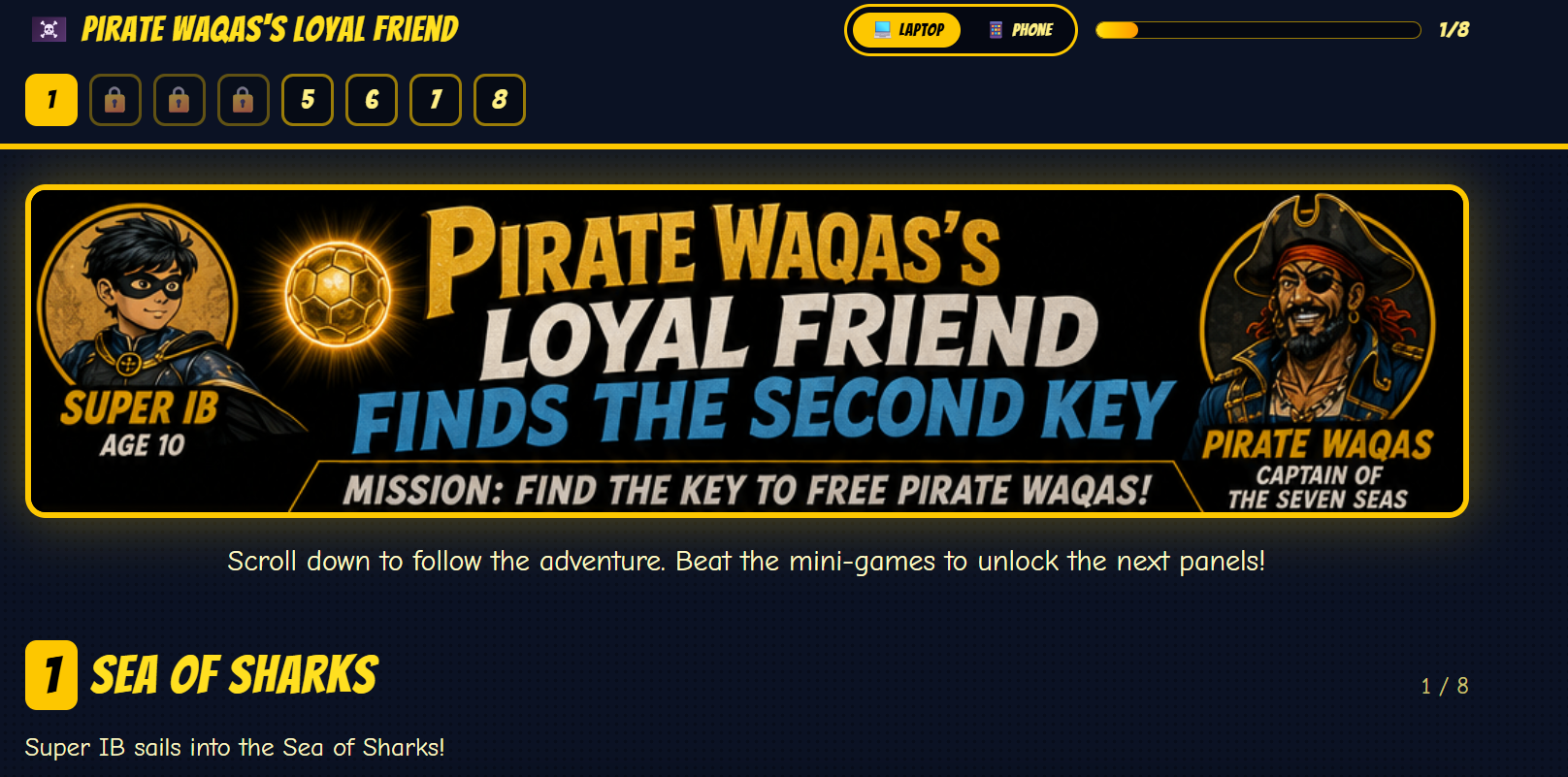
What it is: A narrative adventure game where the player takes on the role of Super IB, exploring islands, solving puzzles, and searching for a key to rescue a captain.
How it works: Unlike a single-mechanic game (dodge, collect, react), an adventure game needs to track a lot of persistent state at once: which islands the player has visited, which puzzles are solved, whether the key has been found, and what dialogue or story beats have already played out. Notably, this project wasn't built in Scratch—Ibraheem used Lovable, an AI-assisted app-building tool, to construct it, meaning he was directing the tool's output rather than hand-coding every interaction block by block.
Why it's impressive: Multi-scene, puzzle-based adventure games require structured thinking about game state and story logic—closer to how real narrative games and interactive fiction are architected than a simple arcade game and using an AI-assisted tool to build it doesn't skip the programming foundation; it shows that foundation transferring into a new kind of tool, since Ibraheem still needed to understand what logic to ask for and how the pieces needed to fit together.
How this was built: Ibraheem's path illustrates how the courses layer on top of each other rather than existing as one-off options. The logic foundation started in Scratch Level 1 and Scratch Level 2, covering variables, events, and multi-level game structure. Python Level 1 introduced real text-based syntax, easing the jump from Scratch's blocks using visual art built in Processing. Python Level 2 then introduced object-oriented programming—the concept of structuring code around objects with their own properties and behavior, which underlies how a game tracks multiple puzzle states, inventory items, and story branches at once. For a narrative-driven, puzzle-based adventure specifically, Game Development with Unity (Age 12+) is the course built for multi-scene, exploration-based projects like this one, using proper scene management and scripting instead of an AI-assisted builder.
The pattern across all three
None of these kids started with an advanced tool. They started with Scratch, kept building, and let their projects get harder as their skills did—which is exactly what our progressive curriculum is designed to do. A maze game becomes a pseudo-3D maze game. A ping pong game becomes a bouncing-ball physics simulation in Python. A Scratch sprite becomes a fully explorable pirate adventure. If your child has an idea for a game, any game there's almost certainly a course on this list that gets them there.
0 Comments
You must be logged in to share a comment. Click here to Login
No comments yet. Be the first to start the conversation!